Enjoy the convenience of managing your Hughesnet® account directly on your TV with the new myHughesnet (TV) app for compatible Android TVs.
Download the App:
Step 1: Search for myHughesnet (TV) app Google Play Store on your Android TV.
Step 2: Download and install the app. Once installed, login using your myHughesnet.com account.

myHughesnet (TV) App Features Include:
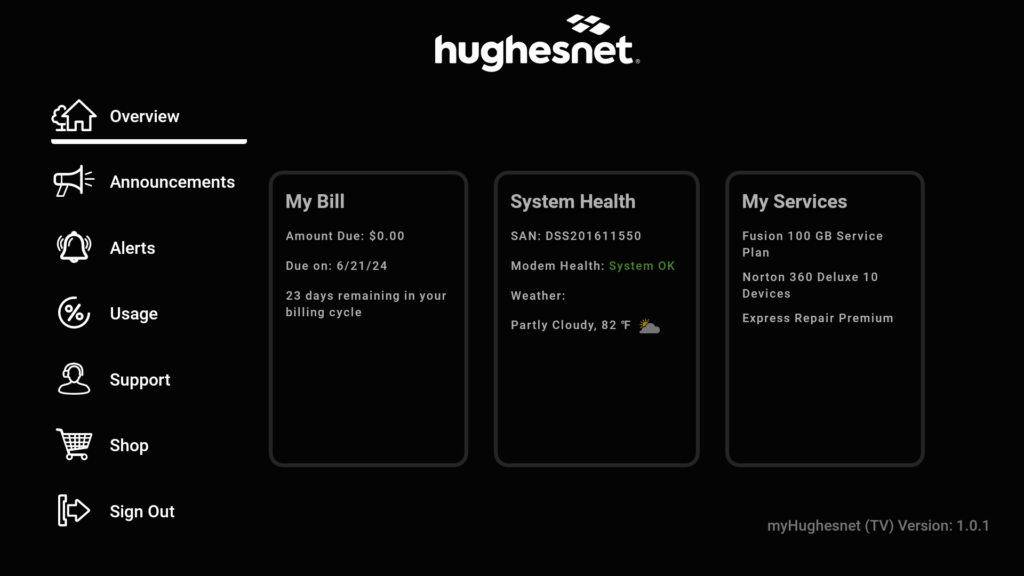
Account Overview: Get a quick snapshot of your account information.
- My Bill: access your current bill amount, due date, and more.
- System Health: Check the health of your modem to receive optimal performance.
- My Services: Check the details of your subscribed services, including any optional services.
Access Alerts: Stay informed with important notifications and promotions.
Track Usage: Monitor your remaining data for the current cycle.